
Updated October 1, 2026
Anki Alternatives for Students in 2026
By Keanu, founder of Quizzify · Updated October 1, 2026
The best Anki alternative for students depends on what you want to change: making cards, organizing notes, finding ready-made sets, or deciding what to review. This guide compares four alternatives with Anki, including free limits, paid plans, and a real example of turning notes into practice questions.
For practice questions generated from your own lecture material, my recommendation is Quizzify. It combines mixed question formats, feedback on written answers, and scheduled review. If you prefer making flashcards inside your notes, consider RemNote. For free flashcard study modes, consider Knowt; for sets your class already uses, consider Quizlet.
The best Anki alternatives by study need
| Tool | Best fit | How you study | Free access |
|---|---|---|---|
| Quizzify | Quizzes from your notes with answer feedback | Generate questions from files, answer them, and return when due | 100 credits per week shared across AI features |
| RemNote | Notes and flashcards in one workspace | Build cards from notes and use spaced repetition | Unlimited notes/cards, 3 annotated documents, 250 AI credits per month |
| Knowt | Free flashcard practice in several modes | Flashcards, Learn, Practice Test, Match, and Spaced Repetition | Unlimited sets and study modes on your own sets; AI limits apply |
| Quizlet | Finding sets for your course | Shared sets, flashcards, and plan-dependent practice modes | Free account; premium modes have limits |
| Anki | Customizable flashcards and offline review | Make or import cards, recall the answer, and rate yourself | Desktop, web sync, and Android; official iOS app sold separately |
If making cards is the reason you keep postponing study, start with one lecture in Quizzify. If your existing Anki deck already covers your course well, you can keep it and use generated quizzes for new lecture material.
Turn your lecture notes into a practice quiz free →
1 Quizzify for quizzes from your own notes
Quizzify suits students who want to move from course material to answering questions. Upload a PDF, PowerPoint, DOCX, text file, or image, or paste your notes. Choose written-answer, multiple-choice, true/false, matching, or case-study questions. You can edit generated questions before studying.
The difference from a standard flashcard session is the feedback. For written answers, Quizzify uses AI to score your response and explain what needs correcting. Multiple-choice, true/false, and matching answers are checked against stored answers. Each question gets a future review date based on your performance.
Under the default schedule, a score below 60/100 brings a question back after one day. A first successful review schedules it three days later; the next successful review schedules it six days later. Later intervals adjust with performance. A separate fixed-interval setting is available.
Choose Quizzify if you have lecture files ready, want several question formats, and want feedback on what you write. Its text-based Socratic tutor can also help you work through a difficult concept.
Check before switching: generation, AI grading, and tutoring need an internet connection. Anki offers more control over card templates and scheduling. Quizzify's beta Anki importer supports basic question-and-answer content, with migration limits explained below.
What the free plan includes
You get 100 credits per week. A quiz generation run costs 30 credits, AI answer evaluation costs 1 credit, and a tutor request costs 3 credits. These use the same allowance; other AI features can also consume credits. Three generation runs use 90 credits, leaving 10 for other actions.
For a useful first session, generate one quiz and use some remaining credits to try written-answer feedback. Standard Pro plans are US$9.99/month, US$29.99 once for four months, or US$59.99/year. See current pricing for introductory and lifetime offers. Monthly and yearly plans renew; the semester pass is a one-time purchase.
A real notes to quiz example
Here is a short passage from our original sample circuit notes:
Ohm's law is V = I × R: voltage equals current times resistance. A 6-ohm resistor connected to a 12-volt supply carries 2 amperes. Two 6-ohm resistors in series have a total resistance of 12 ohms, so the same 12-volt supply produces 1 ampere.
Quizzify generated two written-answer questions and two multiple-choice questions from the full notes. The question below asks for the relationship between voltage, current, and resistance.
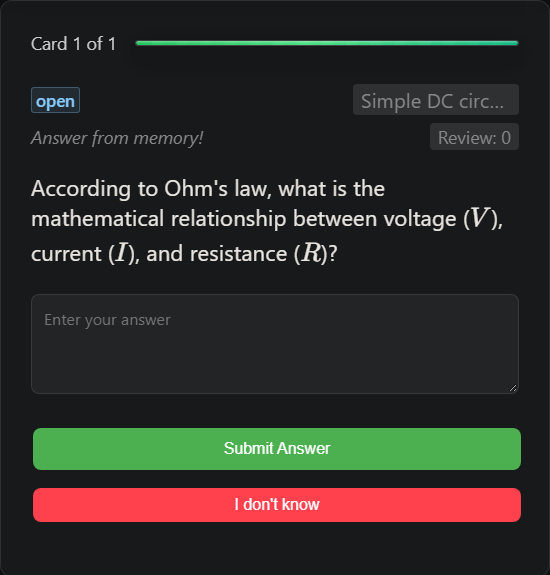
For this demonstration, we answered “Voltage equals current divided by resistance.” Quizzify scored it 40%, identified that the relationship uses multiplication, and scheduled another review after one day.
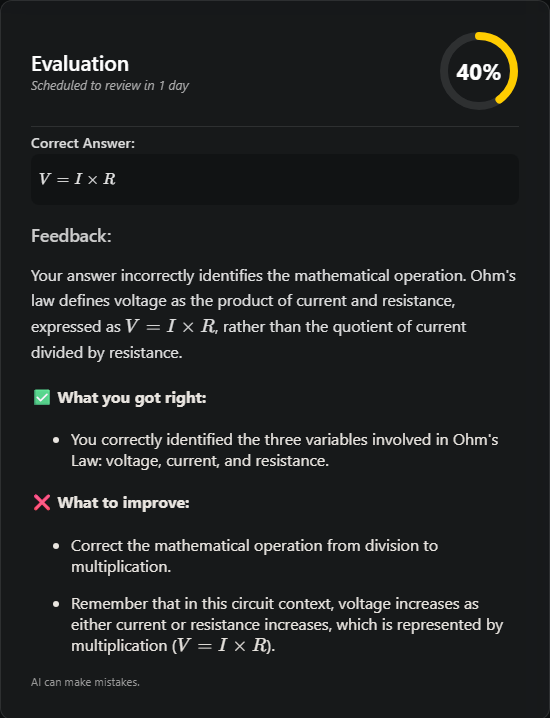
This is where the workflow differs from Anki's usual answer reveal and self-rating: you write an answer and receive feedback on it. AI feedback can be wrong, so compare an unexpected correction with your source. This example shows one result, not an accuracy benchmark.
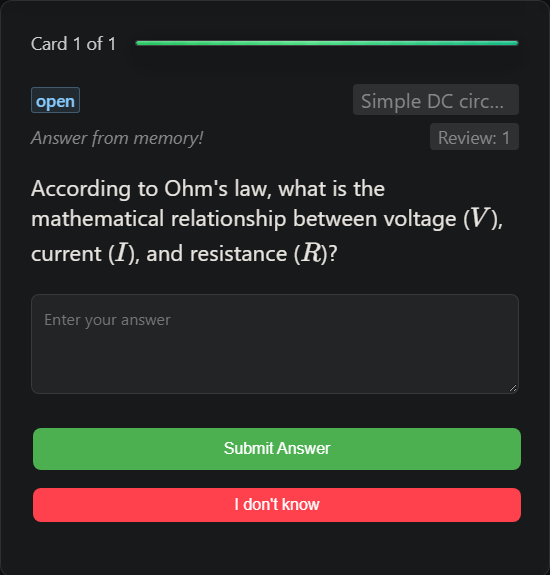
These screenshots come from a local test account using real AI-generated questions and grading. For the return visit, the test clock was advanced 25 hours so the calculated review date had passed. It is a simulated next day, not an observed student return. The same example appears in our Penseum comparison.
Try the same workflow with your own notes →
2 RemNote for notes and flashcards together
RemNote makes sense if you want to write notes and create flashcards in the same workspace. It combines note-taking, spaced repetition, PDF study tools, and AI features.
Choose it if you want your notes connected to the cards you review. If you mainly want a quiz from an existing lecture file, compare its generation workflow with Quizzify before committing to a new note-taking system.
The free plan has limits on document annotation and AI use. Pro is $96 billed yearly, equivalent to $8/month, with 1,000 monthly AI credits. Pro with AI is $216 billed yearly, equivalent to $18/month, with 20,000 monthly AI credits. Compare allowances as well as the subscription price.
3 Knowt for free flashcard study modes
Knowt's free plan includes unlimited sets and access to Learn, Practice Test, Match, Flashcards, and Spaced Repetition on your own sets.
Choose it if you want different ways to practise a set without paying for those study modes. The distinction to watch is between studying sets and using AI to process lecture files: the free AI summarizer currently allows one summary per month.
Knowt Ultra removes ads and adds AI file tools. Its listed price is $24.99/month or $149.99/year. If you mainly need flashcard drilling, try the free modes before deciding whether you need Ultra.
4 Quizlet for shared course sets
Quizlet is worth checking when classmates or teachers already have sets for your course. Starting with a relevant set can reduce setup, although you still need to check its answers and coverage against your syllabus.
Choose it if finding and practising an existing set is your priority. Quizlet also offers AI practice tests from uploaded notes, subject to plan and availability limits.
According to Quizlet's subscription guide, basic Plus has monthly limits on premium tools; Plus Unlimited provides broader access. Compare the plans on the upgrade page. A free account does not mean unlimited access to every practice mode.
Free and paid plans compared
| Tool | Free option to try first | Published paid offer |
|---|---|---|
| Quizzify | 100 credits/week; generation costs 30 per run | US$9.99/month, US$29.99/four-month pass, or US$59.99/year |
| RemNote | Unlimited notes/cards; document and AI limits | Pro $96/year; Pro with AI $216/year |
| Knowt | Study modes on your own sets; AI limits | Ultra $24.99/month or $149.99/year |
| Quizlet | Flashcards and limited access to premium modes | Check current Plus and Plus Unlimited offers at checkout |
| Anki | Desktop, AnkiWeb sync, and AnkiDroid | Official AnkiMobile for iOS is a one-time purchase |
Quizzify prices are USD. Competitor prices are shown as published on the linked official pages; confirm currency, taxes, billing period, and renewal terms at checkout. AI credits are different units in each product, so a larger credit allowance does not necessarily buy more quizzes.
Quizzify vs Anki for daily study
Both tools support repeated recall. The practical choice is how you want to create your material, check answers, and control review.
| Decision | Quizzify | Anki |
|---|---|---|
| Starting with a lecture PDF | Generate practice questions directly | Create/import cards or use an add-on or another tool |
| Checking a written explanation | AI score and feedback | Usually reveal the answer and rate your own recall |
| Review scheduling | Score-based intervals with fewer settings | FSRS and detailed deck options |
| Existing decks | Beta import of basic .apkg content | Native decks, templates, and review history |
| Offline study | AI features need an internet connection | Desktop and mobile apps support offline review |
Anki remains a strong choice for offline flashcards, custom card templates, and established shared decks. Its FSRS settings let you choose a desired retention level and optimize scheduling from review history.
If those controls matter to your routine, keep them. If writing cards is the bottleneck, try Quizzify on the next lecture and compare the questions with what you would have made yourself.
Switching with an existing Anki deck
Quizzify's beta .apkg importer can extract basic question-and-answer content. It does not recreate Anki's complete study setup: complex templates, add-ons, and existing review history do not transfer as equivalent features.
Keep your original deck and test a small copy first. Inspect the imported questions before moving more material. For image occlusion or heavily customized cards, check the result individually rather than assuming every card will work the same way.
Choosing for medical school
For a trusted shared deck, image occlusion, or a large collection maintained over years, Anki is a strong starting point. Quizzify is useful for generating practice from lectures specific to your school and getting feedback on written explanations.
You can keep Anki for an established deck and use Quizzify for current lectures. The deciding question is whether the new practice covers material your existing deck misses.
How to choose your Anki alternative
Start with the part of studying you want to change:
- Making questions takes too long: try Quizzify with one lecture file.
- You want to make cards while writing notes: try RemNote.
- You want free flashcard study modes: try Knowt.
- Your class already shares useful sets: check Quizlet.
- Offline access and detailed flashcard controls matter most: keep Anki.
For generated questions, inspect the coverage, answer one written question, and check whether the feedback helps you correct a mistake. A small trial with your own material is more useful than comparing feature counts alone.
For context on repeated review inside Quizzify, our study report analyzes 192,728 active-recall attempts from 4,538 users. It reports improvement on repeated cards, not a controlled comparison with Anki or proof of higher exam grades.
Frequently asked questions
What is the best Anki alternative for students?
Quizzify is my recommendation for practice quizzes from your own notes with written-answer feedback and scheduled review. RemNote suits notes and flashcards together, Knowt suits free flashcard study modes, and Quizlet suits finding shared course sets.
What is a free Anki alternative with spaced repetition?
Knowt includes Spaced Repetition on your own sets for free. RemNote also offers free flashcards with spaced repetition. Quizzify includes scheduled review and 100 weekly credits for AI features; quiz generation costs 30 credits per run.
Which Anki alternative can make questions from PDFs?
Quizzify can generate mixed practice questions from PDFs, slides, documents, and images. RemNote and Quizlet also offer AI study tools for uploaded material. Compare the question formats, feedback, and free limits for the workflow you need.
Can Quizzify import Anki decks?
Yes. Quizzify has a beta importer for basic question-and-answer content from .apkg files. Complex templates, add-ons, and Anki review history do not transfer as equivalent features. Try a small copy of your deck first.
Does Quizzify use spaced repetition?
Yes. Quizzify schedules questions from your scores. Under the default schedule, a score below 60/100 returns after one day; successful reviews start with intervals of three days, then six days. Later intervals adjust with performance. Anki offers more detailed scheduling controls.
Is Quizzify free?
Quizzify offers 100 credits per week. Quiz generation costs 30 credits per run, AI answer evaluation costs 1 credit, and a tutor request costs 3 credits. These and other AI features share the same allowance.
Is Anki or Quizzify better for medical school?
Anki is a strong choice for established shared decks, image occlusion, and detailed scheduling. Quizzify suits generating practice questions from your own lectures and getting feedback on written answers. You can use them for different parts of the same course.
Make your first practice quiz free →
Related: Penseum alternatives · Studley AI alternatives · How to use Quizzify for exams
Comparison method: features and prices checked against the linked official sources on October 1, 2026. Recommendations reflect the study needs described here; the hands-on example covers Quizzify only. Features and offers can change.
Related Resources
Keep studying with practical guides and plan details.